
A few friends decide to play Minecraft together for a couple of weeks. They all have different schedules, so the group is rarely online at the same time, but they still want a shared world that anyone can drop into when they are free.
The usual options all force a compromise. A free host is limited and often frustrating to manage. A rented dedicated server is simple enough, but it runs 24/7, even when nobody is playing, so the cost adds up quickly for what amounts to a few hours of actual use each week. Running it at home ties up your hardware, keeps a device online, and makes you handle the network yourself.
What if the server only ran when someone actually wanted to play? That is the idea behind on-demand compute, and it is what aws-mc is built to do. Instead of keeping a server alive permanently, the system stores the world independently and starts a container only when a player connects. When everyone logs off, it shuts back down.
What is on-demand compute?
Lots of game services adopt cloud technologies to distribute infrastructure and serve users near where they are located. This means that they do not have to manage the physical side of the infrastructure - only the applications - and users across the globe can still access responsive services. Whilst a small friend group will not have those needs, cloud platforms can still offer useful features.
On-demand compute allows you to run services and workloads only when you need them. The resources cost nothing while idle, which cuts wasted spend on workloads that do not run continuously. Different platforms describe it differently, but if you are using AWS, you can choose the instance type that fits your workload. AWS Fargate can run a container exactly when you need it, with as-you-go pricing that makes it appealing for this use case.
How does aws-mc help?
I started aws-mc as a direct Terraform port of minecraft-aws-ondemand because I liked the idea of declaring the whole stack in code. You did not have to click through the AWS Management Console; you just specified the configuration you wanted - and the tooling handled the rest.
Making the solution low-code was a priority because it meant people less familiar with AWS could work through the repository and tweak it to host what they wanted. Terraform is often seen as tooling for people who already know AWS, but I preferred a declarative config file over a full codebase for scaffolding the server.
Wake Compute
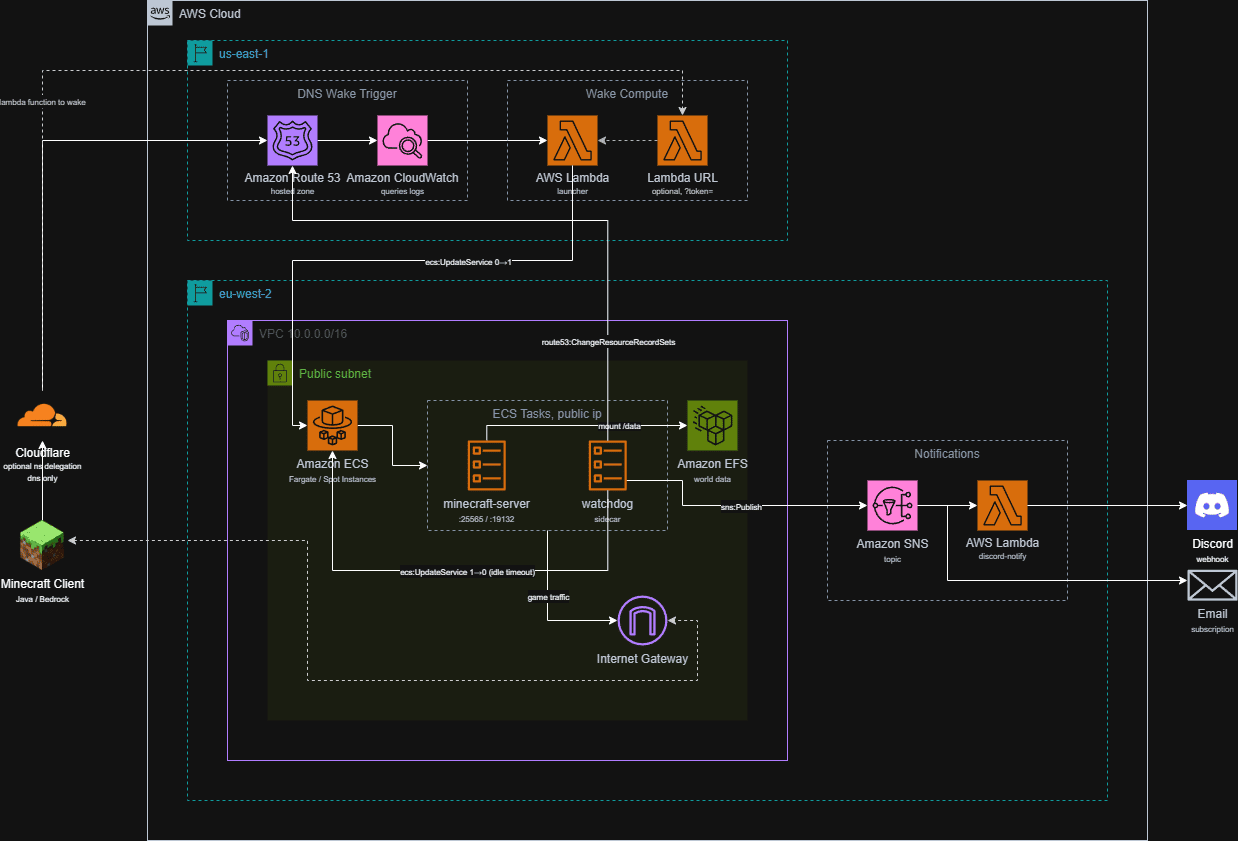
One of the first features incorporated directly from minecraft-aws-ondemand was wake by DNS. When a player adds the server to their Minecraft client and the client performs the SRV lookup, Route 53 answers the query and logs it. A CloudWatch Logs subscription filter catches that log entry and invokes the launcher Lambda, which sets the ECS service to desired_count = 1.
The catch is that CloudWatch Logs delivery is not instant. The first connection attempt may fail because the lookup has not yet triggered the launcher, and you have to wait a minute or two before trying again. That delay is what pushed me to add a second wake path.
The alternative is a Lambda Function URL, enabled with enable_start_api = true. Visiting the URL with its generated token immediately tells ECS to scale the service to 1, bypassing the CloudWatch Logs wait entirely. I use this to start the server from my phone while I am walking over to my desk, so by the time the PC and Minecraft client are ready, the server is already coming up.
Scale-To-Zero & Watchdog
By default, the ECS service runs with desired_count set to 0, so the server is not running at all and ongoing compute cost is effectively zero. The watchdog container runs in the same task as Minecraft and polls the server for connected players, typically through the query protocol or RCON. Once shutdown_minutes have passed with no players connected, it scales the service back down to 0.
The watchdog also handles the Route 53 A record. When the task starts, it waits for Minecraft to report healthy and then points the A record at the task's public IP. When it scales down, the DNS entry no longer resolves to a running server, which is fine because the next wake event will update it again.
This pairing of wake and sleep is what makes the stack cheap. You pay for compute only during the window between the first player connecting and the last player leaving.
Spot Instances
Spot Instances are spare capacity sold at a steep discount - often 70% to 90% below on-demand pricing - but they require interrupt-tolerant workloads. Because they use AWS's pool of unused capacity, AWS can reclaim that capacity for another customer at any time.
For a Minecraft server, this is less of a problem than it sounds. In my own experience on eu-west-2, it has been rare, but it depends on region and time of day. An occasional disconnect is annoying, though Minecraft itself copes well with brief interruptions because the world state is held on EFS.
To put the numbers in context: a traditional Fargate on-demand task costs around 5¢/hour, while the same task on Fargate Spot costs around 1.5¢/hour. That is roughly a 70% reduction, just from choosing the Spot pricing tier.
| Hosting Method | Uptime | Est. Monthly Cost (10 hrs/wk) | Hardware Management |
|---|---|---|---|
| Traditional Home Server | 24/7 | Free, ignoring electricity | High (self-hosted, local network) |
| Standard Rented Dedicated | 24/7 | High ($5-$20+) | Low (managed host) |
| aws-mc (Fargate Spot) | On-Demand | ~$1.20 | Low (Infrastructure as Code) |
Persistent World Storage
The Minecraft world is stored outside the task itself, on an EFS access point mounted into the container at /data. This matters because the Fargate task is entirely ephemeral: if AWS reclaims the Spot capacity, if the watchdog scales the service down after idle time, or if a new task revision starts, the container is replaced, but the world data remains intact.
That separation of compute and storage is what makes the on-demand pattern safe for a game like Minecraft. The task can stop and start repeatedly without the players losing progress, because the persistent state is held independently of the compute that processes it.
There is a caveat worth stating: EFS is not automatically snapshotted when the stack is destroyed. If you tear down the infrastructure without enabling backups first, the world data goes with it. Backups are opt-in for exactly that reason - for a short-lived server, they are often unnecessary cost, but if the world is something you want to keep, you will want to turn them on.
Server Customisation
By using itzg's docker-minecraft-server as the container image, I can set up mods and change the type of the server. It defaults to vanilla, but I can change it to another mod loader like Fabric, Paper or Forge if I want to play around with extra features.

I have attached an example of my configuration below.
./envs/production/terraform.tfvars

domain_name    = "adwo.dev"
subdomain_part = "minecraft"
aws_region     = "eu-west-2"

manage_cloudflare_dns = true
# cloudflare_zone_id and cloudflare_api_token go here

sns_email_address = "your-email@example.com"

minecraft_image_env_vars = {
  TYPE    = "FABRIC"
  VERSION = "1.21.1"  # Minecraft release, not the loader version
  EULA    = "TRUE"

  OPS                   = "blaadam"
  MOTD                  = "§6blaadam's Server§r\n§7Lightly modded · Automatically starts up"
  MAX_PLAYERS           = "10"
  ICON                  = "https://adwo.dev/mc.png"
  OVERWRITE_SERVER_ICON = "true"
  VIEW_DISTANCE       = "12"
  SIMULATION_DISTANCE = "10"

  MODRINTH_PROJECTS              = "fabric-api,lithium,ferrite-core,clientsort,rightclickharvest,crops-love-rain,cloth-config,jamlib,flan"
  MODRINTH_DOWNLOAD_DEPENDENCIES = "required"

  DEBUG = "true"
}

# Defaults (task_cpu=512, task_memory=1024) are tuned for lowest cost on a small
# hobby server. Bump both for actual play.
task_cpu    = 1024 # 1 vCPU
task_memory = 2048 # 2GB - Mojang's official minimum
debug       = true # enables more verbose logging in the ECS task

enable_start_api = true
discord_webhook_url = "https://discord.com/api/webhooks/<your-webhook-url>"
discord_message     = "<@your-discord-user-id>"
Server Type
The first layer of configuration is deciding what kind of server you actually want to run. The minecraft_edition variable selects Java or Bedrock, and then TYPE chooses the loader: vanilla, Fabric, Paper, Forge, or one of the others supported by itzg's image. VERSION then pins the Minecraft release or the loader version you want.
Mod Support
For modded play, the image supports Modrinth directly through MODRINTH_PROJECTS, which takes a comma-separated list of project slugs, and MODRINTH_DOWNLOAD_DEPENDENCIES, which pulls in the required dependencies automatically.
There is a resilience detail worth knowing. If Modrinth's API is unreachable when the container starts, a fallback wrapper detects the outage, unsets the project list, and boots from the mods already cached on EFS. This adds up to around 45 seconds to startup, but it prevents a total failure when Modrinth is having problems. The trade-off is that no new mods are added during a fallback, and if Modrinth fails partway through resolving dependencies, the wrapper does not save you.
Server Settings
Beyond the server type, the image exposes the usual server.properties settings as environment variables. OPS grants operator status on join, MAX_PLAYERS controls the player cap, and MOTD sets the message that appears in the server list. ICON and OVERWRITE_SERVER_ICON handle the server-list icon.
The icon option is worth a small note: without OVERWRITE_SERVER_ICON = "true", itzg's image will not overwrite an existing server-icon.png, so updates to ICON only apply the first time the world is created. Setting it to true ensures the icon is always refreshed on startup.
Performance
Performance splits into two areas: task sizing and in-game render settings. By default, aws-mc provisions task_cpu = 512 and task_memory = 1024, which keeps cost down but is tight for actual play. I would recommend bumping this to at least 1024 / 2048 for a small group, because that matches the memory expectations of a modest Minecraft server.
Inside the image, VIEW_DISTANCE and SIMULATION_DISTANCE control how far the server processes chunks and entities. These are independent of task_cpu and task_memory, and they are the main levers for how responsive the server feels to players.
Notifications
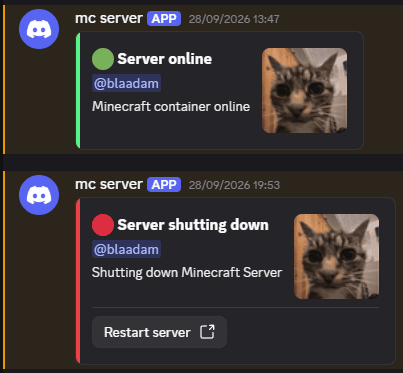
Another feature I added was notifications. When the server starts and stops, or when it crashes, the stack sends a message through SNS email and/or a Discord webhook. I wanted this because it removes the guesswork: I can see from the Discord channel whether the server is up before I open Minecraft.
The shutdown message is particularly useful. It confirms the watchdog has scaled the server down cleanly, and because it can include the just start-url link, it gives anyone in the channel a one-tap way to restart the server without needing AWS credentials. In practice, someone in the group gets the notification on their phone, taps the link, and by the time they have walked over to their PC, the server is already waking up.
Crash Detection and Recovery
Crash detection in aws-mc is handled by an EventBridge rule that watches for the Minecraft container stopping while its task is still meant to be running. Normal scale-down by the watchdog and Spot interruptions do not trigger it, so you only get an alert when something has actually gone wrong.
When the rule fires, it sends a notification through whichever channel you have configured: an SNS email, a Discord webhook, or both. This is useful because the server task can appear healthy in ECS even when the Minecraft container has already crashed, so the alert tells you that players cannot connect before you try to join yourself.
If the container keeps crashing repeatedly, the watchdog gives up after startup_minutes and scales the service back to 0. The next connection attempt then starts a fresh task, which is often enough to recover from transient issues.
A good example of this in practice is the Modrinth API outage. On boot, the itzg image resolves the mod list against Modrinth, and if that API is unreachable, the startup script exits and the container crashes. The wrapper I added probes the Modrinth endpoint first and falls back to cached mods if it cannot reach the API, but a partial failure mid-resolution can still crash the server. Without the crash notification, you would only know something was wrong when you tried to connect and failed.
Console Access
Once the server is running, you still need a way to manage it without exposing unnecessary services to the internet. The just console command gives you either an interactive shell or a one-off command inside the running container through ECS Exec. This is useful because it lets you run admin commands without opening any internet-facing ports - SSM handles the transport over AWS's own network.
RCON is closed to the world by default. If you do need it, you should restrict it to your own IP in rcon_allowed_cidrs, and never set it to 0.0.0.0/0, because RCON authentication is a plaintext password and should not be reachable from the public internet.
There are also manual overrides for when the automation is not enough. just start and just stop let you scale the service directly, and just start-url produces a token-gated URL you can bookmark on a phone or share with someone who does not have AWS credentials on their device. It is deliberately start-only: there is no equivalent stop URL, because the watchdog already handles shutdown through idle detection.
Observability
By default, aws-mc does not scaffold any observability, because every extra CloudWatch object has a cost. If you set enable_observability = true, it creates a CloudWatch dashboard and a small set of alarms that watch for real problems: the launcher Lambda failing to wake the server, and the Discord-notify Lambda failing to send messages.
There is also a long-running safety-net alarm that fires if the server stays up for longer than long_running_alarm_hours. This is designed to catch a stuck watchdog, not to punish a long play session, so you can raise the threshold if your group normally plays for several hours at a time.
For troubleshooting, there are two debug flags. debug = true in Terraform ships ECS task logs to CloudWatch, and DEBUG = "true" in the image env vars traces the itzg startup script in detail. Both are useful when a server will not start, but they add noise and a small ingest cost, so they should be turned off once everything is stable.
The CloudWatch free tier covers 10 alarms and 3 dashboards per account, so for most users the default observability setup costs nothing extra.
Backups
Backups are another feature I built in, even though I keep them turned off myself. For the short Minecraft phase I was aiming for, I wanted the cost to stay as low as possible, and the world was not something I needed to preserve long-term. If that is not true for you, enabling backups is only a few variables:
enable_backup         = true
backup_days_of_week   = ["SUN"]          # or e.g. ["MON", "THU"]
backup_hour           = 9                # UTC
backup_retention_days = 30
Setting enable_backup = true creates an AWS Backup plan for the EFS volume, which is where the world lives. Backups run live against the filesystem, so the server does not need to stop. The default retention is 30 days, and retention is the main cost lever - at roughly $0.05 per GB-month retained, on top of the EFS storage you are already paying for. Once enabled, just backup-status lists the recovery points.
They are off by default because the point of this stack is to keep ongoing cost minimal. If you are running a disposable two-week server, they may not be worth it. If you are keeping the world for longer, they almost certainly are.
The project has many more configurations. If you are interested in exploring them, please check out the aws-mc project.
Trade-offs
There are a few trade-offs to accept before adopting this setup. The DNS wake path depends on CloudWatch Logs delivery, which is not instant. The first connection attempt may fail because the lookup has not yet triggered the launcher, and that is expected behaviour rather than a bug.
Cold starts are also unavoidable. Even after the wake signal fires, ECS still has to schedule the task, pull the container image, boot it, mount EFS, and load the world. On a modded server, the itzg image also resolves the Modrinth project list on every boot, so a Modrinth API outage can still prevent startup even when the mods are already cached locally.
Spot instances can be reclaimed by AWS at any time. In my own experience on eu-west-2, this has been rare, but it depends on region and time of day. An occasional disconnect is annoying, though Minecraft itself copes well with brief interruptions because the world state is held on EFS.
Finally, EFS is durable, but it is not automatically backed up unless you enable backups. The start API URL is also only protected by a generated token, so it should be treated like a secret.
Cost Breakdown
The main cost levers are compute, DNS, and storage. A Fargate Spot task for Minecraft sits at roughly 1.5 cents per hour, compared with about 5 cents per hour for the on-demand equivalent. The Route 53 hosted zone adds roughly 50 cents a month, and EFS charges a small ongoing fee for the world data even when the server is scaled to 0.
Lambda, SNS, and CloudWatch Logs are effectively free at this scale when the server is idle. Optional backups add about 5 cents per GB-month retained.
Putting that together: if the server runs for around 10 hours a week on Spot, compute costs come to about 65 cents a month. Add the 50-cent Route 53 charge and perhaps 20 to 30 cents for EFS storage, and the total is a little over a dollar a month before backups. The same usage on Fargate on-demand would be closer to three dollars.
Common Gotchas and Lessons Learned
A few operational things caught me out while running this for my own group.
When the server is cold, multiple friends refreshing the server list at the same time will all see the same offline message. That is just the CloudWatch Logs delay doing its job. I tell people to wait a minute after the first person tries to connect, rather than everyone hammering refresh.
The Modrinth fallback wrapper has also saved me more than once. If Modrinth is down, the server boots from cached mods and adds a short delay. The gotcha is that it will not add any new mods during that fallback, and it does not help if Modrinth fails partway through resolving dependencies. If a modded server suddenly stops starting, checking Modrinth's status is worth doing before you debug anything else.
Finally, the start URL token should be treated like a password. Anyone with the link can start the server. That is convenient inside a friend group, but it is not something you want posted publicly.
Wider Applications
The same pattern is not limited to Minecraft. Any game server that can tolerate a brief interruption and stores its world separately from the running process is a candidate. Terraria is an obvious example, because its world files are small and its dedicated server starts quickly. Valheim is another good fit, because its dedicated server persists the world to disk and the game handles short interruptions well - players rejoin in the same world state they left. Factorio is a slightly different shape, because its save files can be large, but the principle still holds - the save lives on storage and the compute task only runs during a session.
The concept is not tied to AWS either. Interruptible spot instances exist on GCP Preemptible VMs and Azure Spot Virtual Machines, so you can port the architecture to whichever cloud you already use.
The harder games to fit are competitive shooters or live-service games that assume continuous uptime and persistent matchmaking. Those need something closer to traditional hosting, because brief disconnects or variable startup times would break the experience.
What changes from game to game is usually the storage shape and the idle-detection logic, not the compute pattern itself.
Resources
- aws-mc
An on-demand minecraft server running on AWS to help with cost optimisation.
github.com - minecraft-aws-ondemand
AndresArcones's fork - A template to deploy a serverless Minecraft Server on demand in AWS
github.com - itzg/minecraft-server
A docker image that provides a Minecraft Server for Java Edition that automatically installs/upgrades versions, modloaders, modpacks and more at startup
github.com

